Redux 基础教程,第六部分:异步逻辑与数据获取
本页面由 PageTurner AI 翻译(测试版)。未经项目官方认可。 发现错误? 报告问题 →
- Redux 数据流如何处理异步数据
- 如何使用 Redux 中间件处理异步逻辑
- 处理异步请求状态的模式
- 熟悉使用 HTTP 请求从服务器获取和更新数据
- 理解 JavaScript 中的异步逻辑,包括 Promise
简介
在第五部分:UI 与 React中,我们学习了如何使用 React-Redux 库让 React 组件与 Redux store 交互,包括调用 useSelector 读取 Redux 状态、调用 useDispatch 获取 dispatch 函数,以及使用 <Provider> 组件包裹应用以使这些钩子能够访问 store。
迄今为止,我们处理的所有数据都直接位于 React+Redux 客户端应用内部。然而,大多数实际应用需要通过 HTTP API 调用来获取和保存数据,以使用来自服务器的数据。
在本节中,我们将更新待办事项应用,从 API 获取待办事项,并通过保存至 API 来添加新事项。
本页面由 PageTurner AI 翻译(测试版)。未经项目官方认可。 发现错误? 报告问题 →
请注意,本教程有意展示旧式的 Redux 逻辑模式(这些模式比我们当前推荐的 "现代 Redux" 模式需要编写更多代码),目的是为了解释 Redux 背后的原理和概念。它_并非_用于生产环境的项目。
学习使用 Redux Toolkit 实现 "现代 Redux" 模式,请参考以下文档:
- 完整的 "Redux 必备教程":使用 Redux Toolkit 教授"如何以正确方式使用 Redux"构建真实应用。我们推荐所有 Redux 学习者阅读此教程!
- Redux 基础教程,第 8 部分:使用 Redux Toolkit 的现代 Redux:展示如何将前面章节的底层示例转换为现代 Redux Toolkit 实现
Redux Toolkit 包含 RTK Query 数据获取与缓存 API。RTK Query 是专为 Redux 应用构建的数据获取与缓存解决方案,可消除编写管理数据获取的 任何 thunk 或 reducer 的需要。我们特别将 RTK Query 作为数据获取的默认方法进行教学,且 RTK Query 构建于本页所示的相同模式之上。
学习如何在 Redux 要点教程,第七部分:RTK Query 基础 中使用 RTK Query 进行数据获取。
REST API 与客户端示例
为使示例项目独立且贴近实际,初始项目设置已包含一个用于数据的模拟内存 REST API(使用 Mirage.js 模拟 API 工具配置)。该 API 使用 /fakeApi 作为端点的基础 URL,并为 /fakeApi/todos 支持标准的 GET/POST/PUT/DELETE HTTP 方法。它定义于 src/api/server.js。
项目还包含一个简易 HTTP API 客户端对象,提供 client.get() 和 client.post() 方法,类似于 axios 等流行的 HTTP 库。它定义于 src/api/client.js。
本节我们将使用 client 对象向内存模拟 REST API 发起 HTTP 调用。
Redux 中间件与副作用
Redux store 本身并不感知异步逻辑。它仅知道如何同步分发 action、通过调用根 reducer 函数更新状态,以及通知 UI 变更。所有异步操作必须在 store 外部处理。
此前我们提到,Redux reducer 绝不应包含"副作用"。所谓"副作用",是指在函数返回值之外可被观察到的任何状态或行为变更。常见的副作用包括:
-
在控制台打印值
-
保存文件
-
设置异步定时器
-
发起 HTTP 请求
-
修改函数外部的状态,或更改函数参数
-
生成随机数或唯一随机 ID(如
Math.random()或Date.now())
然而,任何实际应用都_需要_在某个地方执行此类操作。那么,既然不能将副作用放入 reducer,我们该将它们放在_哪里_呢?
Redux 中间件的设计初衷正是为了支持编写包含副作用的逻辑。
正如我们在第4部分提到的,当Redux中间件捕获到分发的action时,几乎可以执行_任何_操作:记录日志、修改action、延迟action、发起异步请求等等。由于中间件形成了围绕真实store.dispatch函数的处理管道,这意味着只要中间件能拦截并处理,我们甚至可以传递_非普通action对象_的值给dispatch。
中间件还可以访问dispatch和getState。这意味着您可以在中间件中编写异步逻辑,同时仍能通过分发action与Redux store交互。
使用中间件实现异步逻辑
我们通过几个示例来了解中间件如何实现与Redux store交互的异步逻辑:
一种常见模式是编写能识别特定action类型的中间件,当检测到这些action时触发异步逻辑,例如:
import { client } from '../api/client'

const delayedActionMiddleware = storeAPI => next => action => {
  if (action.type === 'todos/todoAdded') {
    setTimeout(() => {
      // Delay this action by one second
      next(action)
    }, 1000)
    return
  }

  return next(action)
}

const fetchTodosMiddleware = storeAPI => next => action => {
  if (action.type === 'todos/fetchTodos') {
    // Make an API call to fetch todos from the server
    client.get('todos').then(todos => {
      // Dispatch an action with the todos we received
      storeAPI.dispatch({ type: 'todos/todosLoaded', payload: todos })
    })
  }

  return next(action)
}
有关Redux为何及如何使用中间件处理异步逻辑的更多细节,请参阅Redux创建者Dan Abramov在StackOverflow的回答:
编写异步函数中间件
上节的两个中间件功能单一且高度定制化。理想情况下,我们希望提前编写_任意_异步逻辑(与中间件本身分离),同时仍能访问dispatch和getState来与store交互。
如果编写一个允许向dispatch传递_函数_而非action对象的中间件会怎样? 这样中间件可以检测"action"是否为函数,若是则立即执行该函数。通过这种方式,我们可以在中间件定义之外编写异步逻辑。
这种中间件的实现可能如下:
const asyncFunctionMiddleware = storeAPI => next => action => {
  // If the "action" is actually a function instead...
  if (typeof action === 'function') {
    // then call the function and pass `dispatch` and `getState` as arguments
    return action(storeAPI.dispatch, storeAPI.getState)
  }

  // Otherwise, it's a normal action - send it onwards
  return next(action)
}
随后我们可以这样使用该中间件:
const middlewareEnhancer = applyMiddleware(asyncFunctionMiddleware)
const store = createStore(rootReducer, middlewareEnhancer)

// Write a function that has `dispatch` and `getState` as arguments
const fetchSomeData = (dispatch, getState) => {
  // Make an async HTTP request
  client.get('todos').then(todos => {
    // Dispatch an action with the todos we received
    dispatch({ type: 'todos/todosLoaded', payload: todos })
    // Check the updated store state after dispatching
    const allTodos = getState().todos
    console.log('Number of todos after loading: ', allTodos.length)
  })
}

// Pass the _function_ we wrote to `dispatch`
store.dispatch(fetchSomeData)
// logs: 'Number of todos after loading: ###'
请注意,这个"异步函数中间件"允许我们向dispatch传递_函数_! 在该函数内部,我们可以编写异步逻辑(如HTTP请求),并在请求完成后分发常规action对象。
Redux异步数据流
中间件和异步逻辑如何影响Redux应用的整体数据流?
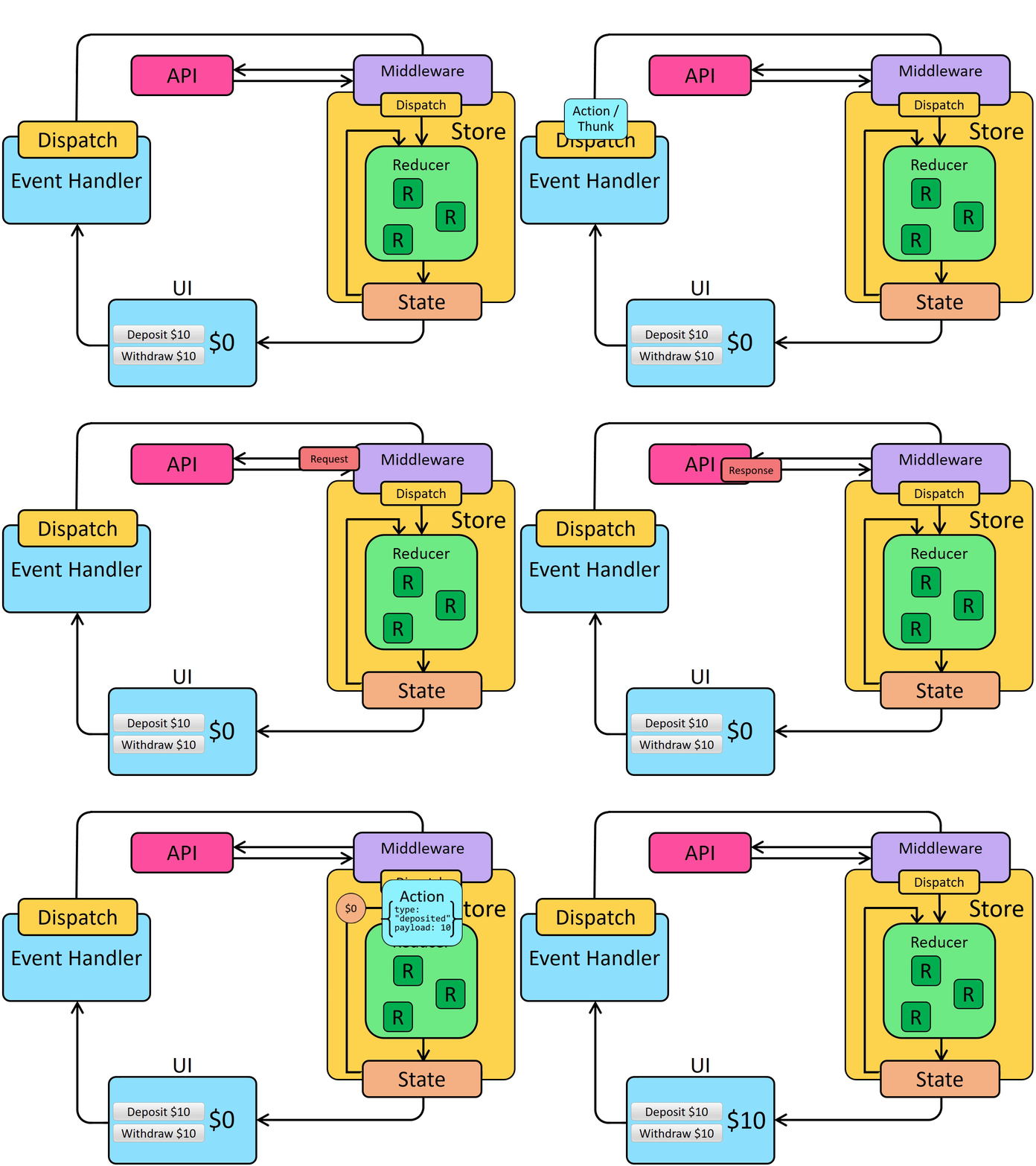
与常规action类似,首先需要处理用户事件(如按钮点击)。然后调用dispatch()并传入_某个值_——无论是普通action对象、函数还是中间件能识别的其他值。
当被分发的值到达中间件时,它可以执行异步调用,并在调用完成后分发真正的action对象。
此前我们见过描述Redux同步数据流的示意图。在Redux应用中添加异步逻辑后,会增加中间件处理环节(如执行HTTP请求),此时异步数据流如下:
使用Redux Thunk中间件
实际上,Redux官方已提供了这种"异步函数中间件"的实现,称为Redux "Thunk"中间件。Thunk中间件允许我们编写接收dispatch和getState作为参数的函数。这些thunk函数可包含任意异步逻辑,并能根据需要分发action和读取store状态。
将异步逻辑编写为 thunk 函数使我们能够复用该逻辑,而无需预先知道要使用哪个 Redux store。
"thunk" 是一个编程术语,意为"一段执行延迟工作的代码"。有关如何使用 thunk 的更多详情,请参阅 thunk 使用指南页面:
以及以下文章:
配置 Store
Redux thunk 中间件在 NPM 上以 redux-thunk 包的形式提供。我们需要安装该包以在应用中使用:
npm install redux-thunk
安装完成后,我们可以在待办事项应用中更新 Redux store 以使用该中间件:
import { createStore, applyMiddleware } from 'redux'
import { thunk } from 'redux-thunk'
import { composeWithDevTools } from 'redux-devtools-extension'
import rootReducer from './reducer'

const composedEnhancer = composeWithDevTools(applyMiddleware(thunk))

// The store now has the ability to accept thunk functions in `dispatch`
const store = createStore(rootReducer, composedEnhancer)
export default store
从服务器获取待办事项
目前我们的待办事项条目仅存在于客户端浏览器中。我们需要一种在应用启动时从服务器加载待办事项列表的方法。
我们将首先编写一个 thunk 函数,该函数向 /fakeApi/todos 端点发起 HTTP 调用以请求待办事项对象数组,然后分发一个包含该数组作为有效负载的 action。由于这一般与 todos 功能相关,我们将在 todosSlice.js 文件中编写该 thunk 函数:
import { client } from '../../api/client'

const initialState = []

export default function todosReducer(state = initialState, action) {
  // omit reducer logic
}

// Thunk function
export async function fetchTodos(dispatch, getState) {
  const response = await client.get('/fakeApi/todos')
  dispatch({ type: 'todos/todosLoaded', payload: response.todos })
}
我们只想在应用首次加载时发起该 API 调用。我们_可以_将其放在几个位置:
-
在
<App>组件的useEffect钩子中 -
在
<TodoList>组件的useEffect钩子中 -
直接放在
index.js文件中,紧接在导入 store 之后
现在,让我们尝试直接将其放在 index.js 中:
import React from 'react'
import { createRoot } from 'react-dom/client'
import { Provider } from 'react-redux'
import './index.css'
import App from './App'

import './api/server'

import store from './store'
import { fetchTodos } from './features/todos/todosSlice'

store.dispatch(fetchTodos)

const root = createRoot(document.getElementById('root'))

root.render(
  <React.StrictMode>
    <Provider store={store}>
      <App />
    </Provider>
  </React.StrictMode>
)
如果重新加载页面,UI 不会有可见变化。但是,如果打开 Redux DevTools 扩展,我们现在应该能看到已分发了一个 'todos/todosLoaded' action,并且它应包含由模拟服务器 API 生成的一些待办事项对象:
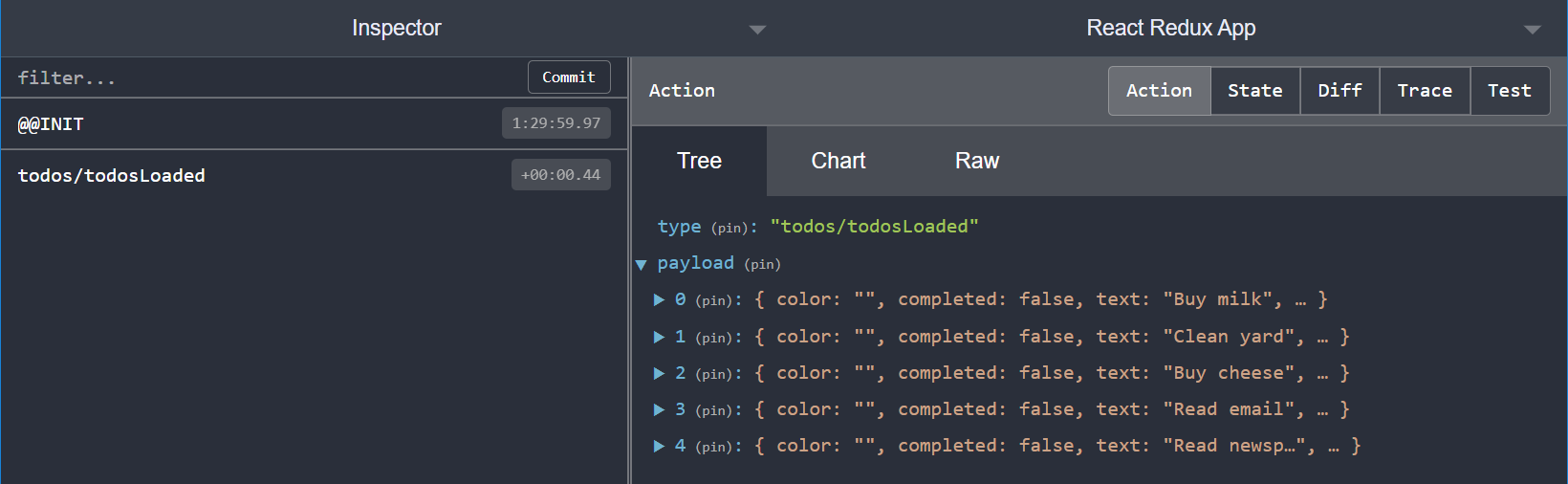
请注意,尽管我们已经分发了 action,但状态并未发生任何变化。我们需要在 todos reducer 中处理此 action 才能更新状态。
让我们在 reducer 中添加一个 case 来将此数据加载到 store 中。由于我们是从服务器获取数据,我们希望完全替换所有现有待办事项,因此可以返回 action.payload 数组作为新的 todos state 值:
import { client } from '../../api/client'

const initialState = []

export default function todosReducer(state = initialState, action) {
  switch (action.type) {
    // omit other reducer cases
    case 'todos/todosLoaded': {
      // Replace the existing state entirely by returning the new value
      return action.payload
    }
    default:
      return state
  }
}

export async function fetchTodos(dispatch, getState) {
  const response = await client.get('/fakeApi/todos')
  dispatch({ type: 'todos/todosLoaded', payload: response.todos })
}
由于分发 action 会立即更新 store,我们也可以在 thunk 中调用 getState 来读取分发后的更新状态值。例如,我们可以在分发 'todos/todosLoaded' action 前后将待办事项总数打印到控制台:
export async function fetchTodos(dispatch, getState) {
  const response = await client.get('/fakeApi/todos')

  const stateBefore = getState()
  console.log('Todos before dispatch: ', stateBefore.todos.length)

  dispatch({ type: 'todos/todosLoaded', payload: response.todos })

  const stateAfter = getState()
  console.log('Todos after dispatch: ', stateAfter.todos.length)
}
保存待办事项
我们还需要在尝试创建新待办事项时更新服务器。我们不应立即分发 'todos/todoAdded' action,而应使用初始数据向服务器发起 API 调用,等待服务器返回新保存的待办事项副本,然后_再_分发包含该待办事项的 action。
然而,如果我们尝试将此逻辑编写为 thunk 函数,会遇到一个问题:由于我们将 thunk 作为单独的函数写在 todosSlice.js 文件中,发起 API 调用的代码并不知道新待办事项的文本内容应是什么:
async function saveNewTodo(dispatch, getState) {
  // ❌ We need to have the text of the new todo, but where is it coming from?
  const initialTodo = { text }
  const response = await client.post('/fakeApi/todos', { todo: initialTodo })
  dispatch({ type: 'todos/todoAdded', payload: response.todo })
}
我们需要一种方法来编写一个函数,它接受 text 作为参数,然后创建实际的 thunk 函数,使其能够使用 text 值发起 API 调用。外层函数应返回这个 thunk 函数,以便在组件中传递给 dispatch。
// Write a synchronous outer function that receives the `text` parameter:
export function saveNewTodo(text) {
  // And then creates and returns the async thunk function:
  return async function saveNewTodoThunk(dispatch, getState) {
    // ✅ Now we can use the text value and send it to the server
    const initialTodo = { text }
    const response = await client.post('/fakeApi/todos', { todo: initialTodo })
    dispatch({ type: 'todos/todoAdded', payload: response.todo })
  }
}
现在我们可以在 <Header> 组件中使用它:
import React, { useState } from 'react'
import { useDispatch } from 'react-redux'

import { saveNewTodo } from '../todos/todosSlice'

const Header = () => {
  const [text, setText] = useState('')
  const dispatch = useDispatch()

  const handleChange = e => setText(e.target.value)

  const handleKeyDown = e => {
    // If the user pressed the Enter key:
    const trimmedText = text.trim()
    if (e.which === 13 && trimmedText) {
      // Create the thunk function with the text the user wrote
      const saveNewTodoThunk = saveNewTodo(trimmedText)
      // Then dispatch the thunk function itself
      dispatch(saveNewTodoThunk)
      setText('')
    }
  }

  // omit rendering output
}
由于我们知道会立即在组件中将 thunk 函数传递给 dispatch,因此可以跳过创建临时变量。相反,我们可以直接调用 saveNewTodo(text),并将生成的 thunk 函数直接传递给 dispatch:
const handleKeyDown = e => {
  // If the user pressed the Enter key:
  const trimmedText = text.trim()
  if (e.which === 13 && trimmedText) {
    // Create the thunk function and immediately dispatch it
    dispatch(saveNewTodo(trimmedText))
    setText('')
  }
}
现在组件实际上并不知道它分发的是 thunk 函数——saveNewTodo 函数封装了实际发生的过程。<Header> 组件只知道当用户按下回车时需要分发_某个值_。
这种编写函数来准备将传递给 dispatch 内容的模式称为**"action creator"模式**,我们将在下一节中详细讨论。
现在我们可以看到更新后的 'todos/todoAdded' action 被分发:
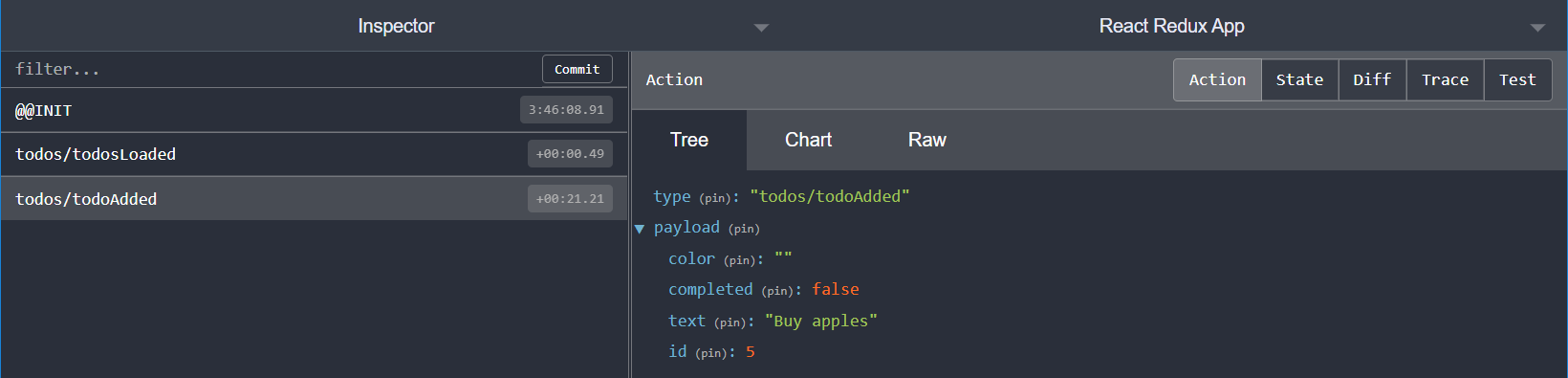
这里我们需要做的最后一件事是更新 todos reducer。当我们向 /fakeApi/todos 发起 POST 请求时,服务器会返回一个全新的 todo 对象(包含新 ID 值)。这意味着 reducer 不必计算新 ID 或填充其他字段——它只需创建包含新 todo 项的新 state 数组:
const initialState = []

export default function todosReducer(state = initialState, action) {
  switch (action.type) {
    case 'todos/todoAdded': {
      // Return a new todos state array with the new todo item at the end
      return [...state, action.payload]
    }
    // omit other cases
    default:
      return state
  }
}
现在添加新 todo 将正常工作:

Thunk 函数既可用于异步逻辑,也可用于同步逻辑。Thunks 提供了一种方法来编写需要访问 dispatch 和 getState 的任何可重用逻辑。
学习要点
现在我们已经成功更新了待办事项应用,可以使用"thunk"函数向模拟服务器 API 发起 HTTP 请求,从而获取待办事项列表并保存新的待办事项。
在此过程中,我们了解了 Redux 中间件如何让我们发起异步调用,并在异步调用完成后通过分发 action 与 store 交互。
当前应用效果如下:
- Redux 中间件旨在支持编写具有副作用的逻辑
- "副作用"指在函数外部改变状态/行为的代码,如 HTTP 请求、修改函数参数或生成随机值
- 中间件为标准 Redux 数据流添加了额外步骤
- 中间件可以拦截传递给
dispatch的其他值 - 中间件可以访问
dispatch和getState,因此它们能分发更多 action 作为异步逻辑的一部分
- 中间件可以拦截传递给
- Redux "Thunk"中间件允许我们将函数传递给
dispatch- "Thunk"函数让我们可以提前编写异步逻辑,无需知道正在使用哪个 Redux store
- Redux thunk 函数接收
dispatch和getState作为参数,并能分发类似"此数据来自 API 响应"的 action
下一步是什么?
现在我们已经涵盖了使用 Redux 的所有核心部分!您已了解如何:
-
编写根据分发的 action 更新状态的 reducers
-
使用 reducer、增强器和中间件创建并配置 Redux store
-
使用中间件编写分发 action 的异步逻辑
在第 7 部分:标准 Redux 模式中,我们将探讨真实 Redux 应用中常用的几种代码模式,以使代码更一致并在应用增长时更好地扩展。