Redux 要点,第二部分:Redux Toolkit 应用结构
本页面由 PageTurner AI 翻译(测试版)。未经项目官方认可。 发现错误? 报告问题 →
- 典型的 React + Redux Toolkit 应用结构
- 如何在 Redux DevTools 扩展中查看状态变化
简介
在第一部分:Redux 概述与核心概念中,我们探讨了 Redux 的用途、描述 Redux 代码各部分的术语和概念,以及数据如何在 Redux 应用中流动。
现在,让我们通过一个实际示例来了解这些部分是如何组合在一起的。
计数器示例应用
我们将要看的示例项目是一个小型计数器应用,通过点击按钮对数字进行加减。它可能不太令人兴奋,但展示了 React+Redux 应用中所有重要部分的实际运作。
该项目是使用官方 Vite 版 Redux Toolkit 模板的精简版本创建的。开箱即用,它已经配置了标准的 Redux 应用结构,使用 Redux Toolkit 创建 Redux store 和逻辑,并使用 React-Redux 将 Redux store 与 React 组件连接起来。
这是该项目的在线版本。你可以点击右侧应用预览中的按钮进行操作,并在左侧浏览源代码文件。
如果希望在本地计算机上设置此项目,可以使用以下命令创建本地副本:
npx degit reduxjs/redux-templates/packages/rtk-app-structure-example my-app
你也可以使用完整的 Redux Toolkit Vite 模板创建新项目:
npx degit reduxjs/redux-templates/packages/vite-template-redux my-app
使用计数器应用
计数器应用已设置好,让我们在使用时可以观察内部发生的情况。
打开浏览器的开发者工具。然后,选择开发者工具中的"Redux"选项卡,并点击右上角工具栏中的"State"按钮。你应该会看到类似这样的内容:
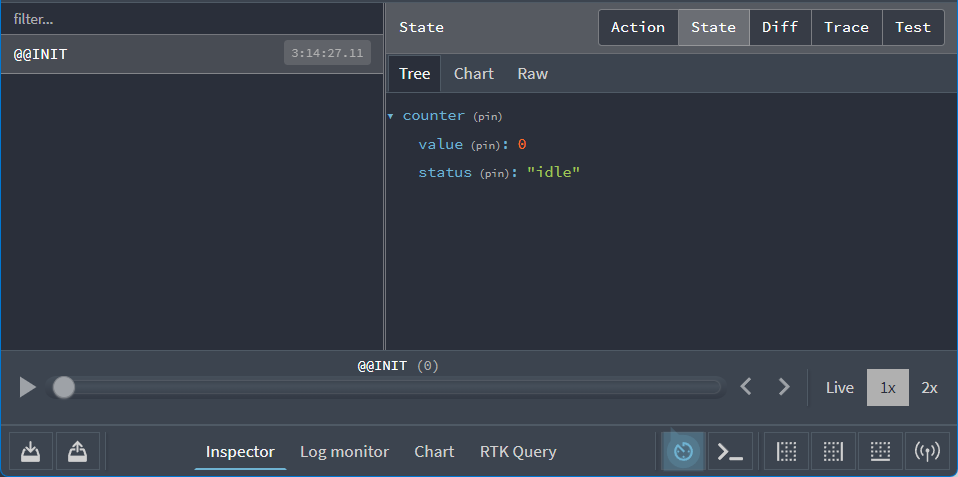
在右侧,我们可以看到 Redux store 的初始应用状态值如下:
{
  counter: {
    value: 0
    status: 'idle'
  }
}
开发者工具将展示我们在使用应用时 store 状态如何变化。
让我们先操作应用看看它的功能。点击应用中的"+"按钮,然后在 Redux DevTools 中查看"Diff"选项卡:
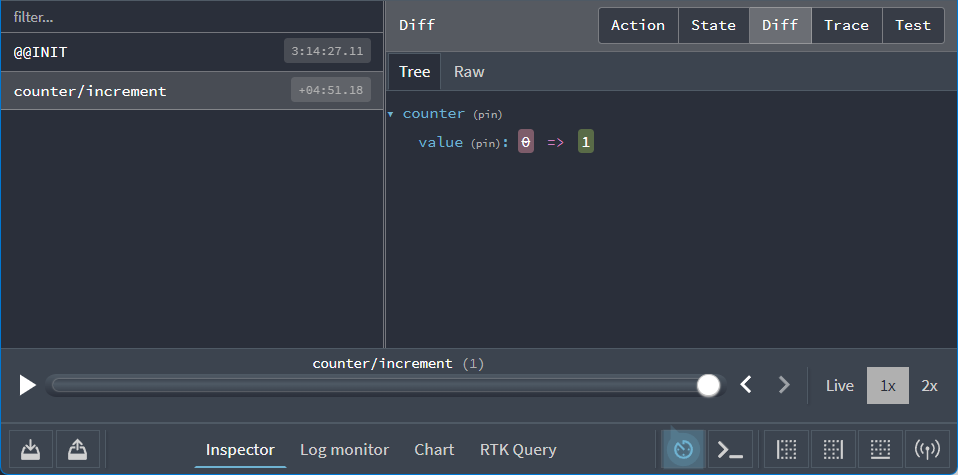
我们在此可以看到两个重要事项:
-
当我们点击"+"按钮时,一个类型为
"counter/increment"的 action 被派发到了 store -
当该 action 被派发时,
state.counter.value字段从0变为了1
现在尝试以下步骤:
-
再次点击"+"按钮。显示值现在应为 2。
-
点击"-"按钮一次。显示值现在应为 1。
-
点击"Add Amount"按钮。显示值现在应为 3。
-
将文本框中的数字"2"改为"3"
-
点击"Add Async"按钮。你应该会看到按钮内出现进度条,几秒后显示值将变为 6。
返回 Redux DevTools。您会看到共派发了五个 action,对应每次按钮点击操作。现在从左侧列表选择最后一个 "counter/incrementByAmount" 条目,并点击右侧的 "Action" 标签页:
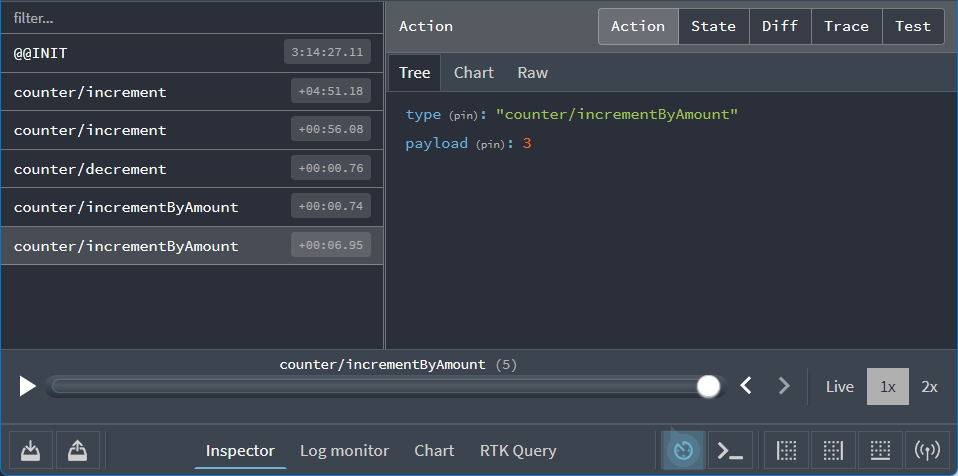
可以看到该 action 对象结构如下:
{
  type: 'counter/incrementByAmount',
  payload: 3
}
若点击 "Diff" 标签页,您会观察到响应此 action 后,state.counter.value 字段值从 3 变为 6。
实时查看应用内部状态变化的能力非常强大!
DevTools 提供更多命令和选项协助调试。尝试点击右上角的 "Trace" 标签页,您将在面板中看到 JavaScript 函数调用堆栈,其中高亮显示了 action 到达 store 时正在执行的代码行——特别是从 <Counter> 组件派发此 action 的代码位置:
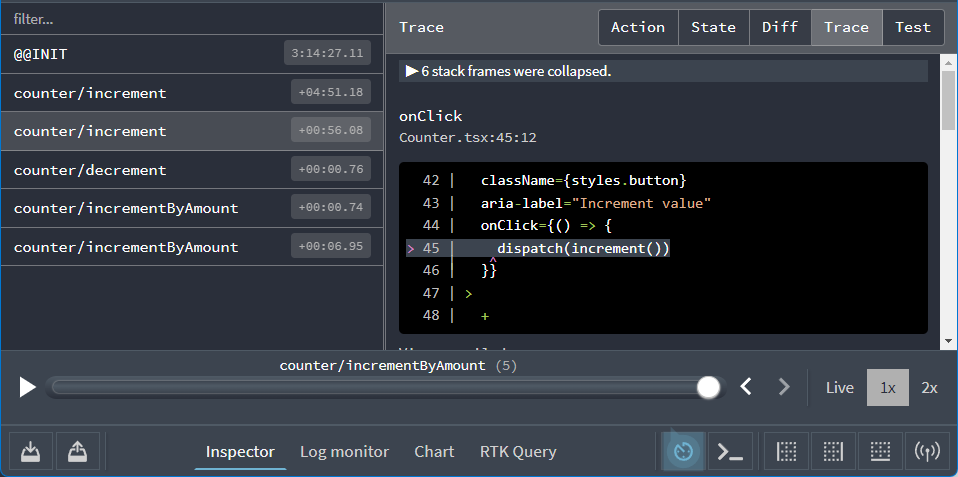
这使得追踪代码派发路径更加便捷。
应用结构解析
了解应用功能后,让我们深入其实现原理。
以下是构成此应用的核心文件:
/srcmain.tsx:应用入口文件App.tsx:顶级 React 组件/appstore.ts:创建 Redux store 实例hooks.ts:导出预置类型的 React-Redux hooks
/features/counterCounter.tsx:计数器功能的 React UI 组件counterSlice.ts:计数器功能的 Redux 逻辑层
让我们从 Redux store 的创建过程开始解析。
创建 Redux Store
打开 app/store.ts 文件,其内容如下:
import type { Action, ThunkAction } from '@reduxjs/toolkit'
import { configureStore } from '@reduxjs/toolkit'
import counterReducer from '@/features/counter/counterSlice'

export const store = configureStore({
  reducer: {
    counter: counterReducer
  }
})

// Infer the type of `store`
export type AppStore = typeof store
export type RootState = ReturnType<AppStore['getState']>
// Infer the `AppDispatch` type from the store itself
export type AppDispatch = AppStore['dispatch']
// Define a reusable type describing thunk functions
export type AppThunk<ThunkReturnType = void> = ThunkAction<
  ThunkReturnType,
  RootState,
  unknown,
  Action
>
Redux store 通过 Redux Toolkit 的 configureStore 函数创建,configureStore 要求传入 reducer 参数。
应用可能包含多个功能模块,每个模块可能拥有独立的 reducer 函数。调用 configureStore 时,我们可在对象参数中传入所有 reducer。对象的键名将决定最终状态树中的对应字段。
features/counter/counterSlice.ts 文件以 ESM 默认导出形式提供了计数器逻辑的 reducer 函数。我们可将其导入当前文件(注意:此导入/导出行为遵循标准 ES 模块语法,并非 Redux 特有)。本例中我们将其命名为 counterReducer 并用于创建 store:
当传入 {counter: counterReducer} 此类对象时,即声明我们需要在 Redux 状态树中创建 state.counter 字段,且由 counterReducer 函数负责决定在 action 派发时是否及如何更新 state.counter 字段。
Redux 支持通过各类插件("中间件"和"增强器")自定义 store 配置。configureStore 默认自动添加多款中间件以优化开发体验,同时配置 store 使其可被 Redux DevTools 扩展程序检测。
对于 TypeScript 使用场景,我们还需基于 Store 导出可复用类型(如 RootState 和 AppDispatch)。后续章节将展示这些类型的实际应用。
Redux 切片
"切片"(slice)是应用中单个功能对应的 Redux reducer 逻辑和 action 的集合,通常定义在同一个文件中。其名称源于将根 Redux 状态对象拆分为多个独立的"状态切片"。
例如在博客应用中,我们的 store 结构可能如下:
import { configureStore } from '@reduxjs/toolkit'
import usersReducer from '../features/users/usersSlice'
import postsReducer from '../features/posts/postsSlice'
import commentsReducer from '../features/comments/commentsSlice'

export const store = configureStore({
  reducer: {
    users: usersReducer,
    posts: postsReducer,
    comments: commentsReducer
  }
})
在该示例中,state.users、state.posts 和 state.comments 都是 Redux 状态中的独立 "切片"。由于 usersReducer 负责更新 state.users 切片,我们将其称为 "切片 reducer" 函数。
Detailed Explanation: Reducers and State Structure
A Redux store needs to have a single "root reducer" function passed in when it's created. So if we have many different slice reducer functions, how do we get a single root reducer instead, and how does this define the contents of the Redux store state?
If we tried calling all of the slice reducers by hand, it might look like this:
function rootReducer(state = {}, action) {
  return {
    users: usersReducer(state.users, action),
    posts: postsReducer(state.posts, action),
    comments: commentsReducer(state.comments, action)
  }
}
That calls each slice reducer individually, passes in the specific slice of the Redux state, and includes each return value in the final new Redux state object.
Redux has a function called combineReducers that does this for us automatically. It accepts an object full of slice reducers as its argument, and returns a function that calls each slice reducer whenever an action is dispatched. The result from each slice reducer are all combined together into a single object as the final result. We can do the same thing as the previous example using combineReducers:
const rootReducer = combineReducers({
  users: usersReducer,
  posts: postsReducer,
  comments: commentsReducer
})
When we pass an object of slice reducers to configureStore, it passes those to combineReducers for us to generate the root reducer.
As we saw earlier, you can also pass a reducer function directly as the reducer argument:
const store = configureStore({
  reducer: rootReducer
})
创建切片 Reducer 和 Action
我们知道 counterReducer 函数来自 features/counter/counterSlice.ts,现在让我们逐段查看该文件内容。
import { createAsyncThunk, createSlice } from '@reduxjs/toolkit'
import type { PayloadAction } from '@reduxjs/toolkit'

// Define the TS type for the counter slice's state
export interface CounterState {
  value: number
  status: 'idle' | 'loading' | 'failed'
}

// Define the initial value for the slice state
const initialState: CounterState = {
  value: 0,
  status: 'idle'
}

// Slices contain Redux reducer logic for updating state, and
// generate actions that can be dispatched to trigger those updates.
export const counterSlice = createSlice({
  name: 'counter',
  initialState,
  // The `reducers` field lets us define reducers and generate associated actions
  reducers: {
    increment: state => {
      // Redux Toolkit allows us to write "mutating" logic in reducers. It
      // doesn't actually mutate the state because it uses the Immer library,
      // which detects changes to a "draft state" and produces a brand new
      // immutable state based off those changes
      state.value += 1
    },
    decrement: state => {
      state.value -= 1
    },
    // Use the PayloadAction type to declare the contents of `action.payload`
    incrementByAmount: (state, action: PayloadAction<number>) => {
      state.value += action.payload
    }
  }
})

// Export the generated action creators for use in components
export const { increment, decrement, incrementByAmount } = counterSlice.actions

// Export the slice reducer for use in the store configuration
export default counterSlice.reducer
之前我们看到 UI 中不同按钮的点击会派发三种不同的 Redux action 类型:
-
{type: "counter/increment"} -
{type: "counter/decrement"} -
{type: "counter/incrementByAmount"}
我们知道 action 是包含 type 字段的普通对象,type 字段始终是字符串类型,且通常会有创建并返回 action 对象的"action 创建器"函数。那么这些 action 对象、类型字符串和 action 创建器定义在何处呢?
我们_可以_每次都手动编写这些内容,但这会非常繁琐。更重要的是,在 Redux 中真正关键的是 reducer 函数及其计算新状态的逻辑。
Redux Toolkit 提供了 createSlice 函数,它能自动生成 action 类型字符串、action 创建器函数和 action 对象。你只需为切片定义名称,编写包含 reducer 函数的对象,相应的 action 代码便会自动生成。name 选项的字符串作为每个 action 类型的第一部分,每个 reducer 函数的键名作为第二部分。因此,"counter" 名称 + "increment" reducer 函数会生成 {type: "counter/increment"} 的 action 类型。(毕竟如果计算机能代劳,何必手动编写!)
除了 name 字段,createSlice 还需要我们传入 reducer 的初始状态值,确保首次调用时有可用的 state。本例中,我们提供了包含初始值 0 的 value 字段和初始状态为 'idle' 的 status 字段。
我们在这里可以看到有三个 reducer 函数,这对应于通过点击不同按钮所分发的三种不同的 action 类型。
createSlice 会自动生成与我们编写的 reducer 函数同名的 action creator。我们可以通过调用其中一个并查看其返回内容来验证:
console.log(counterSlice.actions.increment())
// {type: "counter/increment"}
它还会生成知道如何响应所有这些 action 类型的 slice reducer 函数:
const newState = counterSlice.reducer(
  { value: 10 },
  counterSlice.actions.increment()
)
console.log(newState)
// {value: 11}
Reducer 规则
Reducer 的规则
-
它们应该只根据
state和action参数来计算新的状态值 -
不允许直接修改现有的
state。相反,必须通过复制现有state并对副本进行修改,实现 不可变更新。
-
禁止直接修改现有 state,而应通过复制现有状态并进行变更来实现_不可变更新_
-
必须是"纯"函数——不得包含任何异步逻辑或其他"副作用"
这些规则为何重要?主要有以下原因:
-
另一方面,若函数依赖外部变量或行为随机,运行时结果将无法预测。
-
若函数修改了其他值(包括其参数),可能导致应用行为异常。这是常见的错误来源,例如“我更新了状态,但 UI 却没有按预期更新!”
-
Redux DevTools 的某些功能依赖于 reducer 正确遵循这些规则
其中“不可变更新”这条规则尤为重要,值得深入探讨。
Reducer 与不可变更新
此前我们讨论了“变更”(修改现有对象/数组值)与“不可变性”(将值视为不可更改)。
在 Redux 中,reducer 绝对不允许更改原始/当前状态值!
// ❌ Illegal - by default, this will mutate the state!
state.value = 123
在 Redux 中禁止直接修改状态的原因如下:
-
会导致错误,例如 UI 无法正确更新以显示最新值
-
使状态更新的原因和过程难以理解
-
增加测试编写的难度
-
破坏“时间旅行调试”功能的正确使用
-
违背 Redux 的设计理念和使用模式
既然无法更改原始数据,我们如何返回更新后的状态?
Reducer 只能创建原始值的副本,然后对副本进行变更。
// ✅ This is safe, because we made a copy
return {
  ...state,
  value: 123
}
我们已了解如何手动编写不可变更新,即通过 JavaScript 的数组/对象展开运算符及其他返回原始值副本的函数。但若你认为“手动编写不可变更新既难记又易错”……没错,确实如此! :)
手动编写不可变更新逻辑确实困难,而在 reducer 中意外变更状态是 Redux 用户最常见的错误。
因此 Redux Toolkit 的 createSlice 函数提供了更简单的不可变更新方式!
createSlice 内部使用了 Immer 库。Immer 通过名为 Proxy 的特殊 JS 工具包装数据,允许你编写“直接变更”包装数据的代码。但 Immer 会追踪所有变更意图,并据此返回安全的不可变更新值,效果等同于手动编写不可变更新逻辑。
因此,无需这样写:
function handwrittenReducer(state, action) {
  return {
    ...state,
    first: {
      ...state.first,
      second: {
        ...state.first.second,
        [action.someId]: {
          ...state.first.second[action.someId],
          fourth: action.someValue
        }
      }
    }
  }
}
你可以这样写:
function reducerWithImmer(state, action) {
  state.first.second[action.someId].fourth = action.someValue
}
这样可读性强多了!
但有一点至关重要:
你只能在 Redux Toolkit 的 createSlice 和 createReducer 中编写“直接变更”逻辑,因为它们内部使用了 Immer!若在没有 Immer 的代码中直接变更状态,将会引发错误!
记住这一点后,让我们回到计数器切片的实际 reducer 代码。
export const counterSlice = createSlice({
  name: 'counter',
  initialState,
  // The `reducers` field lets us define reducers and generate associated actions
  reducers: {
    increment: state => {
      // Redux Toolkit allows us to write "mutating" logic in reducers. It
      // doesn't actually mutate the state because it uses the Immer library,
      // which detects changes to a "draft state" and produces a brand new
      // immutable state based off those changes
      state.value += 1
    },
    decrement: state => {
      state.value -= 1
    },
    // Use the PayloadAction type to declare the contents of `action.payload`
    incrementByAmount: (state, action: PayloadAction<number>) => {
      state.value += action.payload
    }
  }
})
可见 increment reducer 总是将 state.value 加 1。由于 Immer 能检测到草稿 state 对象的变更,此处无需显式返回内容。同理,decrement reducer 执行减 1 操作。
在这两个 reducer 中,我们实际上不需要让代码查看 action 对象。虽然它会被传入,但由于我们不需要使用,可以直接省略 reducer 参数中的 action 声明。
另一方面,incrementByAmount reducer 确实需要知道关键信息:计数器值应增加多少。因此我们声明该 reducer 同时接收 state 和 action 参数。在此场景中,我们知道在"amount"输入框输入的数字会存入 action.payload 字段,所以可以将其添加到 state.value。
如果使用 TypeScript,需要明确告知 TS action.payload 的类型。PayloadAction 类型表示"这是一个 action 对象,其中 action.payload 的类型是..."你指定的类型。本例中,UI 会获取"amount"输入框的数字字符串并转换为数值后派发 action,因此我们声明为 action: PayloadAction<number>。
关于不可变性和编写不可变更新的更多信息,请参阅《不可变更新模式》文档页及《React 和 Redux 不可变性完全指南》。
关于使用 Immer 进行"可变式"不可变更新的细节,请查看Immer 文档及《使用 Immer 编写 Reducer》文档页。
更多 Redux 逻辑
Redux 的核心是 reducer、action 和 store。此外还有几种常用的 Redux 函数类型。
使用选择器读取数据
调用 store.getState() 可获取完整的根状态对象,并通过 state.counter.value 等方式访问字段。
通常我们会编写"选择器"函数来封装状态字段查询。本例中,counterSlice.ts 导出了两个可复用的选择器函数:
// Selector functions allows us to select a value from the Redux root state.
// Selectors can also be defined inline in the `useSelector` call
// in a component, or inside the `createSlice.selectors` field.
export const selectCount = (state: RootState) => state.counter.value
export const selectStatus = (state: RootState) => state.counter.status
选择器函数通常以整个 Redux 根状态对象作为参数。它们可以读取根状态中的特定值,或进行计算后返回新值。
由于使用 TypeScript,还需要从 store.ts 导入导出的 RootState 类型,用于定义每个选择器中 state 参数的类型。
注意:不必为每个切片的每个字段都创建独立的选择器函数!(本例这样做是为了展示选择器概念,但 counterSlice.ts 中仅有两个字段)相反,应平衡选择器的编写数量。
我们将在第 4 部分:使用 Redux 数据深入探讨选择器函数,并在第 6 部分:性能优化中学习如何优化选择器。
更多关于为何及如何使用选择器函数的详细解析,请参阅《使用选择器派生数据》。
使用 Thunk 编写异步逻辑
截至目前,我们应用中的所有逻辑都是同步的:action 被派发 → store 执行 reducer 计算新状态 → dispatch 函数结束。但 JavaScript 本身支持多种异步代码编写方式,且应用通常需要异步逻辑(例如从 API 获取数据)。我们需要在 Redux 应用中安排异步逻辑的位置。
Thunk 是一种特殊的 Redux 函数,可包含异步逻辑。Thunk 通过两个函数实现:
-
内部 thunk 函数:接收
dispatch和getState作为参数 -
外部创建函数:创建并返回 thunk 函数
counterSlice 导出的下一个函数是 thunk action 创建函数的示例:
// The function below is called a thunk, which can contain both sync and async logic
// that has access to both `dispatch` and `getState`. They can be dispatched like
// a regular action: `dispatch(incrementIfOdd(10))`.
// Here's an example of conditionally dispatching actions based on current state.
export const incrementIfOdd = (amount: number): AppThunk => {
  return (dispatch, getState) => {
    const currentValue = selectCount(getState())
    if (currentValue % 2 === 1) {
      dispatch(incrementByAmount(amount))
    }
  }
}
在此 thunk 中,我们使用 getState() 获取存储的当前根状态值,并用 dispatch() 派发另一个 action。此处也可轻松添加异步逻辑,例如 setTimeout 或 await。
其使用方式与常规 Redux action 创建函数相同:
store.dispatch(incrementIfOdd(6))
使用 thunk 需要在创建 Redux 存储时添加 redux-thunk 中间件(Redux 的插件类型)。幸运的是,Redux Toolkit 的 configureStore 方法已自动完成此设置,因此我们可直接使用 thunk。
编写 thunk 时需确保 dispatch 和 getState 类型正确。本可定义为 (dispatch: AppDispatch, getState: () => RootState),但标准做法是在存储文件中定义可复用的 AppThunk 类型。
当需要发起 HTTP 调用从服务器获取数据时,可将调用逻辑置于 thunk 中。以下为详细示例:
// the outside "thunk creator" function
const fetchUserById = (userId: string): AppThunk => {
  // the inside "thunk function"
  return async (dispatch, getState) => {
    try {
      dispatch(userPending())
      // make an async call in the thunk
      const user = await userAPI.fetchById(userId)
      // dispatch an action when we get the response back
      dispatch(userLoaded(user))
    } catch (err) {
      // If something went wrong, handle it here
    }
  }
}
Redux Toolkit 内置的 createAsyncThunk 方法可自动处理所有派发流程。counterSlice.ts 中的下一个函数是模拟带计数器值的 API 请求的异步 thunk。派发此 thunk 时,它会在请求前派发 pending action,并在异步逻辑完成后派发 fulfilled 或 rejected action。
// Thunks are commonly used for async logic like fetching data.
// The `createAsyncThunk` method is used to generate thunks that
// dispatch pending/fulfilled/rejected actions based on a promise.
// In this example, we make a mock async request and return the result.
// The `createSlice.extraReducers` field can handle these actions
// and update the state with the results.
export const incrementAsync = createAsyncThunk(
  'counter/fetchCount',
  async (amount: number) => {
    const response = await fetchCount(amount)
    // The value we return becomes the `fulfilled` action payload
    return response.data
  }
)
使用 createAsyncThunk 时,需在 createSlice.extraReducers 中处理其 action。本例中我们处理全部三种 action 类型,同时更新 status 和 value 字段:
export const counterSlice = createSlice({
  name: 'counter',
  initialState,
  reducers: {
    // omit reducers
  },
  // The `extraReducers` field lets the slice handle actions defined elsewhere,
  // including actions generated by createAsyncThunk or in other slices.
  extraReducers: builder => {
    builder
      // Handle the action types defined by the `incrementAsync` thunk defined below.
      // This lets the slice reducer update the state with request status and results.
      .addCase(incrementAsync.pending, state => {
        state.status = 'loading'
      })
      .addCase(incrementAsync.fulfilled, (state, action) => {
        state.status = 'idle'
        state.value += action.payload
      })
      .addCase(incrementAsync.rejected, state => {
        state.status = 'failed'
      })
  }
})
若对为何使用 thunk 处理异步逻辑存疑,可参阅深度解析:
Detailed Explanation: Thunks and Async Logic
We know that we're not allowed to put any kind of async logic in reducers. But, that logic has to live somewhere.
If we had access to the Redux store, we could write some async code and call store.dispatch() when we're done:
const store = configureStore({ reducer: counterReducer })

setTimeout(() => {
  store.dispatch(increment())
}, 250)
But, in a real Redux app, we're not allowed to import the store into other files, especially in our React components, because it makes that code harder to test and reuse.
In addition, we often need to write some async logic that we know will be used with some store, eventually, but we don't know which store.
The Redux store can be extended with "middleware", which are a kind of add-on or plugin that can add extra abilities. The most common reason to use middleware is to let you write code that can have async logic, but still talk to the store at the same time. They can also modify the store so that we can call dispatch() and pass in values that are not plain action objects, like functions or Promises.
The Redux Thunk middleware modifies the store to let you pass functions into dispatch. In fact, it's short enough we can paste it here:
const thunkMiddleware =
  ({ dispatch, getState }) =>
  next =>
  action => {
    if (typeof action === 'function') {
      return action(dispatch, getState)
    }

    return next(action)
  }
It looks to see if the "action" that was passed into dispatch is actually a function instead of a plain action object. If it's actually a function, it calls the function, and returns the result. Otherwise, since this must be an action object, it passes the action forward to the store.
This gives us a way to write whatever sync or async code we want, while still having access to dispatch and getState.
React 计数器组件
此前我们已见过独立的 React <Counter> 组件。当前 React+Redux 应用中的 <Counter> 组件功能类似,但存在关键差异。
首先查看 Counter.tsx 组件文件:
import { useState } from 'react'

// Use pre-typed versions of the React-Redux
// `useDispatch` and `useSelector` hooks
import { useAppDispatch, useAppSelector } from '@/app/hooks'
import {
  decrement,
  increment,
  incrementAsync,
  incrementByAmount,
  incrementIfOdd,
  selectCount,
  selectStatus
} from './counterSlice'

import styles from './Counter.module.css'

export function Counter() {
  const dispatch = useAppDispatch()
  const count = useAppSelector(selectCount)
  const status = useAppSelector(selectStatus)
  const [incrementAmount, setIncrementAmount] = useState('2')

  const incrementValue = Number(incrementAmount) || 0

  return (
    <div>
      <div className={styles.row}>
        <button
          className={styles.button}
          aria-label="Decrement value"
          onClick={() => {
            dispatch(decrement())
          }}
        >
          -
        </button>
        <span aria-label="Count" className={styles.value}>
          {count}
        </span>
        <button
          className={styles.button}
          aria-label="Increment value"
          onClick={() => {
            dispatch(increment())
          }}
        >
          +
        </button>
        {/* omit additional rendering output here */}
      </div>
    </div>
  )
}
与先前纯 React 示例类似,我们有个名为 Counter 的函数组件,其使用 useState Hook 存储数据。
但值得注意的是,当前组件并未将计数器实际值存储为状态。虽然存在名为 count 的变量,但它并非来源于 useState Hook。
React 虽内置了 useState 和 useEffect 等 Hook,但其他库可基于 React Hook 构建自定义逻辑,创建自定义 Hook。
React-Redux 库提供了一套允许 React 组件与 Redux 存储交互的自定义 Hook。
使用 useSelector 读取数据
首先,useSelector 钩子让组件能够从 Redux 状态树中提取所需的数据片段。
此前我们提到过,可以编写接收 state 参数并返回部分状态值的"选择器"函数。特别地,counterSlice.ts 文件导出了 selectCount 和 selectStatus 选择器
若能访问 Redux 仓库,可通过以下方式获取当前计数器值:
const count = selectCount(store.getState())
console.log(count)
// 0
由于禁止在组件文件中导入 Redux 仓库,组件无法直接与其通信。但 useSelector 会在幕后处理与仓库的交互——若传入选择器函数,它会自动执行 someSelector(store.getState()) 并返回结果。
因此获取当前计数器值的代码可简化为:
const count = useSelector(selectCount)
我们并非只能使用已导出的选择器。例如,可以内联编写选择器函数作为 useSelector 的参数:
const countPlusTwo = useSelector((state: RootState) => state.counter.value + 2)
每当动作派发导致 Redux 仓库更新时,useSelector 都会重新执行选择器函数。若返回值发生变化,useSelector 将确保组件使用新值重新渲染。
通过 useDispatch 派发动作
同理,若能访问 Redux 仓库,可通过动作创建函数派发动作(如 store.dispatch(increment()))。由于无法直接访问仓库,我们需要获取 dispatch 方法的途径。
useDispatch 钩子正是为此设计,它会返回 Redux 仓库的实际 dispatch 方法:
const dispatch = useDispatch()
这样就能在用户点击按钮等操作时派发动作:
<button
  className={styles.button}
  aria-label="Increment value"
  onClick={() => {
    dispatch(increment())
  }}
>
  +
</button>
定义预类型化的 React-Redux 钩子
默认情况下,useSelector 钩子要求为每个选择器函数显式声明 (state: RootState)。我们可以创建预类型化的 useSelector 和 useDispatch 钩子,避免重复编写 : RootState。
import { useDispatch, useSelector } from 'react-redux'
import type { AppDispatch, RootState } from './store'

// Use throughout your app instead of plain `useDispatch` and `useSelector`
export const useAppDispatch = useDispatch.withTypes<AppDispatch>()
export const useAppSelector = useSelector.withTypes<RootState>()
随后在组件中导入 useAppSelector 和 useAppDispatch 钩子替代原始版本:
组件状态与表单
此时您可能产生疑问:"是否必须将所有应用状态都放入 Redux 仓库?"
答案是否定的。全局共享状态应存入 Redux 仓库,而仅限单处使用的状态应保留在组件内部。
本例中的数字输入框体现了这一原则:
const [incrementAmount, setIncrementAmount] = useState('2')

const incrementValue = Number(incrementAmount) || 0

// later
return (
  <div className={styles.row}>
    <input
      className={styles.textbox}
      aria-label="Set increment amount"
      value={incrementAmount}
      onChange={e => setIncrementAmount(e.target.value)}
    />
    <button
      className={styles.button}
      onClick={() => dispatch(incrementByAmount(incrementValue))}
    >
      Add Amount
    </button>
    <button
      className={styles.asyncButton}
      onClick={() => dispatch(incrementAsync(incrementValue))}
    >
      Add Async
    </button>
  </div>
)
我们 本可 通过在该输入的 onChange 处理函数中派发动作,将当前输入值存入 Redux store 的 reducer 中。但这并无实际收益——该字符串仅在 <Counter> 组件内使用(当然,此例中仅有一个其他组件:<App>。但即使应用包含更多组件,也只有 <Counter> 关注此输入值)。
因此,使用 useState 钩子在 <Counter> 组件内管理该值更为合理。
同理,若存在名为 isDropdownOpen 的布尔标记,其他组件无需感知此状态——应严格保留在组件内部。
在 React + Redux 应用中,全局状态应存入 Redux 仓库,局部状态应保留在 React 组件内。
若不确定状态归属,以下经验法则可帮助判断数据是否应放入 Redux:
-
应用其他部分是否关注此数据?
-
是否需要基于此原始数据派生出衍生数据?
-
相同数据是否驱动多个组件?
-
能否回溯到特定时间点的状态是否有价值(如时间旅行调试)?
-
是否需要缓存数据(即当数据已存在时直接复用而非重新请求)?
-
热重载 UI 组件时(可能丢失内部状态)是否需要保持数据一致性?
这也是思考 Redux 中表单处理的典型示例。大多数表单状态可能不应保存在 Redux 中。正确的做法是在用户编辑时将数据保留在表单组件内,待用户操作完成后再通过分发 Redux action 更新存储。
在继续之前还需注意:记得 counterSlice.ts 中的 incrementAsync thunk 吗?我们正在该组件中使用它。请注意其调用方式与其他常规 action 创建器完全一致。组件并不关心我们是在分发普通 action 还是启动异步逻辑——它只知道点击按钮时会触发分发操作。
提供 Store
我们知道组件可通过 useSelector 和 useDispatch 钩子与 Redux store 通信。但既然没有导入 store,这些钩子如何知道该与哪个 Redux store 交互呢?
现在我们已经了解了该应用的所有组成部分,是时候回到应用起点,看看最后的关键拼图如何组合了。
import React from 'react'
import { createRoot } from 'react-dom/client'
import { Provider } from 'react-redux'

import App from './App'
import { store } from './app/store'

import './index.css'

const container = document.getElementById('root')!
const root = createRoot(container)

root.render(
  <React.StrictMode>
    <Provider store={store}>
      <App />
    </Provider>
  </React.StrictMode>
)
必须调用 root.render(<App />) 告知 React 开始渲染根组件 <App>。为使 useSelector 等钩子正常工作,需要使用 <Provider> 组件在后台传递 Redux store,让钩子能够访问它。
我们已在 app/store.ts 中创建了 store,因此可在此导入。然后用 <Provider> 包裹整个 <App> 并传入 store:<Provider store={store}>。
现在,任何调用 useSelector 或 useDispatch 的 React 组件都将与我们传给 <Provider> 的 Redux store 通信。
学习要点
尽管计数器示例应用相当简单,但它完整展示了 React + Redux 应用协同工作的关键环节:
- 可使用 Redux Toolkit 的
configureStoreAPI 创建 Redux storeconfigureStore接收名为reducer的函数作为参数configureStore自动以合理默认配置初始化 store
- Redux 逻辑通常组织在称为 "slice" 的文件中
- "slice" 包含与 Redux 状态特定功能/区域相关的 reducer 逻辑和 action
- Redux Toolkit 的
createSliceAPI 为每个 reducer 函数生成对应的 action 创建器和 action 类型
- Redux reducer 必须遵循特定规则
- 应仅基于
state和action参数计算新状态值 - 必须通过复制现有状态进行不可变更新
- 不得包含异步逻辑或其他"副作用"
- Redux Toolkit 的
createSliceAPI 使用 Immer 实现"可突变"的不可变更新
- 应仅基于
- 通过称为 "selector" 的函数读取状态值
- Selector 接收
(state: RootState)作为参数,返回状态值或派生新值 - Selector 可写在 slice 文件中,或内联于
useSelector钩子
- Selector 接收
- 异步逻辑通常写在称为 "thunk" 的特殊函数中
- Thunk 接收
dispatch和getState作为参数 - Redux Toolkit 默认启用
redux-thunk中间件
- Thunk 接收
- React-Redux 实现 React 组件与 Redux store 交互
- 用
<Provider store={store}>包裹应用使所有组件能访问 store useSelector钩子让 React 组件读取 Redux store 值useDispatch钩子允许组件分发 action- 在 TS 使用中,我们创建预定义类型的
useAppSelector和useAppDispatch钩子 - 全局状态应存于 Redux store,局部状态应保留在 React 组件中
- 用
下一步是什么?
既然您已经了解了 Redux 应用的实际运作方式,现在可以开始编写自己的应用了!在本教程后续部分,您将构建一个使用 Redux 的更复杂示例应用。在此过程中,我们将涵盖正确使用 Redux 所需掌握的所有关键概念。
请继续学习第三部分:Redux 基础数据流,开始构建示例应用。